Apple has been circling the smart display for years, and on October 13 it finally landed. HomeView is a $299 touchscreen hub for the kitchen counter or the wall, and pre-orders are open right now. Before you click, though, two details deserve a hard look: it doesn’t ship until November 13, and its headline feature is still labeled beta.
What $299 actually buys
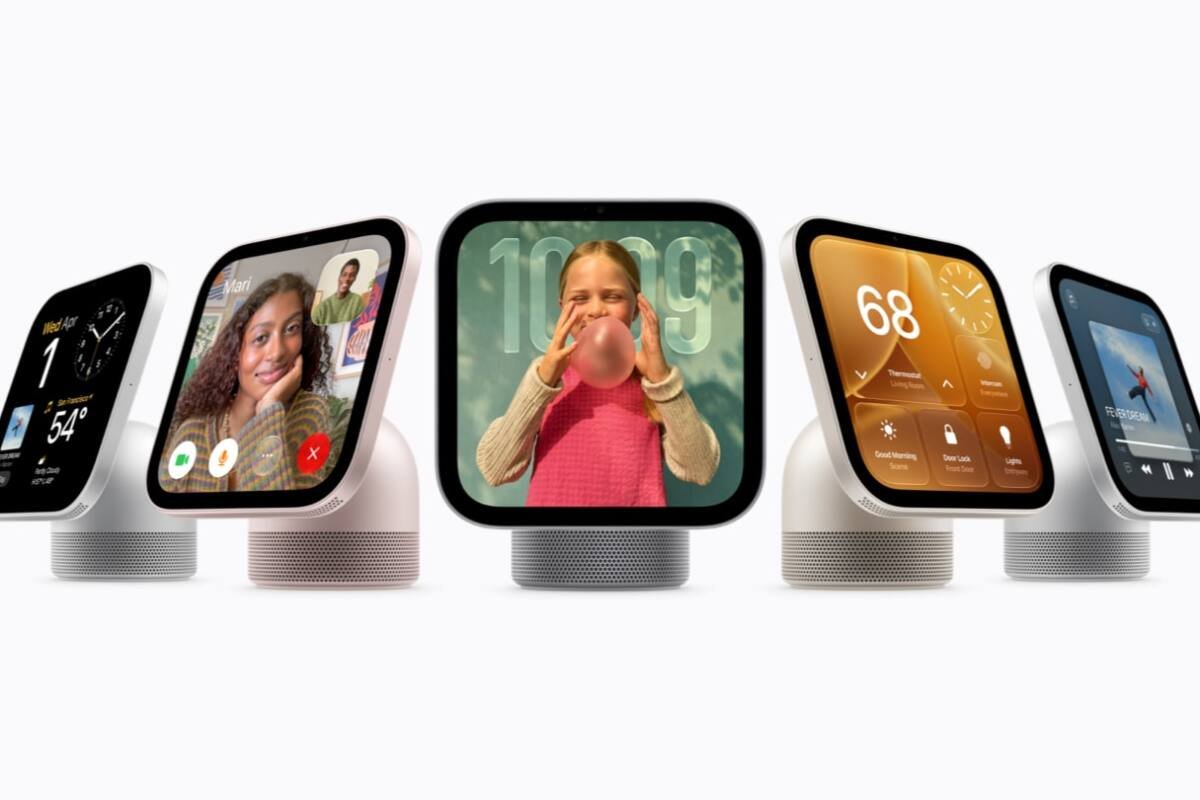
According to Apple’s announcement, HomeView pairs a 7-inch Liquid Retina display with an A18 chip and a tilting aluminum hinge. The screen runs from 500 nits down to 0.3 nits, so it shouldn’t glare at you in a dark bedroom. Sound comes from two full-range drivers, plus a down-firing woofer and two passive radiators, with Spatial Audio support.
The countertop version comes in silver, starlight, rose pink and space gray. A wall-mounted version costs the same $299, and Apple lists mounting options starting at $59.95, so budget a little extra if you want it on the wall rather than on the counter.

The software side is where it tries to be more than a speaker with a screen. HomeView can recognize up to six people by face and give each a personal home screen. It handles FaceTime, Apple Music, Podcasts, multiroom audio and Intercom, and it includes a recipe and timer assistant. It can also listen for smoke and carbon monoxide alarm sounds and alert your paired devices. We covered the lead-up in our Welcome Home event preview.
The fine print worth reading
Apple’s new conversational assistant, Siri AI, is the star here, but Apple describes it as a beta on HomeView (software version 27.2). Its personal features, such as pulling up your calendar, require a paired iPhone or iPad with Apple Intelligence, and they only appear when the device recognizes you and your phone is nearby and recently unlocked.
Camera recognition and video summaries need an iCloud+ subscription. And if you’re in the EU, you can’t buy it at all for now: Apple says HomeView isn’t sold there because Siri AI isn’t currently available in iOS in the region. At launch it’s English-only, covering the U.S., Australia, Canada, India, New Zealand, the UK, plus Singapore and South Africa, with Canadian French promised later.
On privacy, Apple says camera and microphone data is handled in a separate hardware-isolated area it calls Secure Exclaves, and that Siri requests run either on the device or in Private Cloud Compute. Those are company claims, so wait for independent reviewers before treating them as settled.
Who should pre-order, and who should wait
If you already live in Apple’s world, with an iPhone, a HomePod and a Home app full of devices, HomeView is the obvious upgrade, and $299 for this hardware isn’t outrageous. If you mostly want a kitchen timer and music, the gap between the price and what you’ll actually use may be wide.
For everyone else, patience is cheap. The device ships weeks from now, Apple’s own camera and lock lineup doesn’t arrive until December, and the main feature is a beta. Reviews will land before most buyers get a unit. Smart-home hardware also has a habit of looking better in a press photo than on a counter at 7 a.m. If you are weighing home security gear more broadly, our look at Ring’s first smart lock is a useful comparison point.
Bottom Line
HomeView is a credible first try at a home hub, priced at $299 with sensible hardware. But the beta assistant, the iCloud+ requirement for camera features and the November 13 ship date all argue for waiting on reviews unless you’re already committed to Apple’s ecosystem.
FAQ
How much does Apple HomeView cost?
HomeView costs $299 in the U.S., both for the countertop model and the wall-mounted one. Wall mounts are sold separately, with options starting at $59.95.
When can I buy HomeView?
Pre-orders opened on October 13, and general availability is November 13 in the U.S., Australia, Canada, India, New Zealand and the UK. Singapore and South Africa have their own ordering arrangements.
Do I need an iPhone to use HomeView?
Apple’s setup flow and its personal Siri AI features are built around a paired iPhone or iPad with Apple Intelligence, so in practice yes, you’ll want one. Camera recognition and video summaries also require an iCloud+ plan.
Featured image: Apple Newsroom (Apple press images).